

Mobile Banking Solutions: Using BC Game JazzCash Gateways in Pakistan
- Technical Framework: Processing Times and Limits for JazzCash Transactions
- Why Wallet Level Matters Before a PKR Transfer
- Operational Walkthrough: How to Deposit via JazzCash
- What Happens When the USSD Prompt Appears
- Outbound Transfers: Withdrawing Your Balance to a JazzCash Account
- Matching the Wallet Owner Name with the Player Profile
- System Incentives and Automated Player Rewards
- Troubleshooting: Resolving JazzCash Connection Lags and Failed Payments
- Responsible Gambling
Technical Framework: Processing Times and Limits for JazzCash Transactions
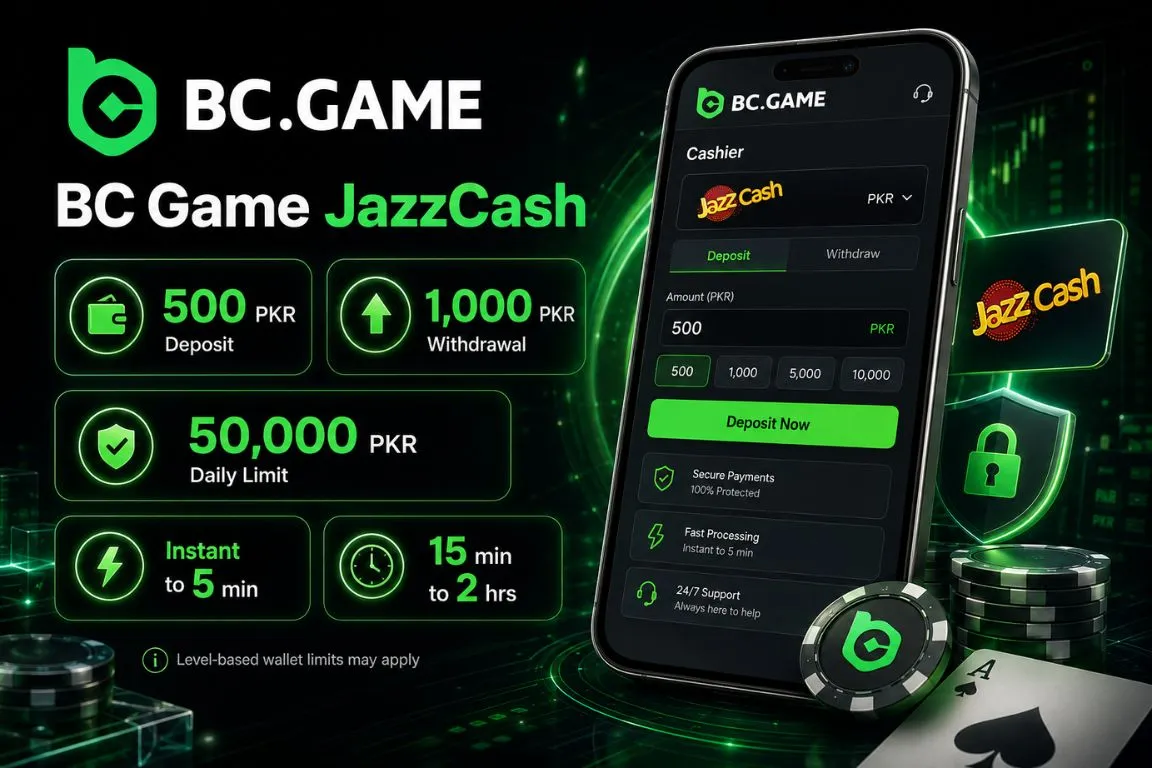
JazzCash is useful for players who keep online payments inside mobile banking. The cashier shows the amount in PKR, so a session budget avoids foreign currency calculation.
The corridor is simple. Deposits start from 500 PKR, withdrawals from 1,000 PKR, and the daily maximum in this setup is 50,000 PKR in both directions. Still, the JazzCash wallet has its own level-based limits. A Level 0 or Level 1 account may stop a transfer before the casino gateway completes it.
| Financial Operations | Account Currency | Minimum Threshold | Daily Maximum Limit | Standard Processing Window |
|---|---|---|---|---|
| Account Deposit | PKR, Pakistani Rupee | 500 PKR | 50,000 PKR | Instant to 5 minutes |
| Account Payout | PKR, Pakistani Rupee | 1,000 PKR | 50,000 PKR | 15 minutes to 2 hours |
Why Wallet Level Matters Before a PKR Transfer
A clean JazzCash payment starts before the player presses Deposit. Check the wallet, the phone, and the security setup first:
- Wallet level. Confirm that your account can handle the intended transfer amount.
- SIM status. Use the number connected to your registered JazzCash wallet.
- Screen access. Keep the phone unlocked while the request is active.
- MPIN readiness. Make sure you can confirm the payment without delay.
- Balance check. Keep enough PKR available for the cashier amount.
This prevents a common failure: the casino screen looks correct, but the mobile wallet blocks the request. Often, the issue is wallet level, signal, or a missed prompt.
Operational Walkthrough: How to Deposit via JazzCash
A JazzCash deposit begins in the BC Game cashier and ends with mobile authorization. It is short, but the timing matters. If the USSD prompt appears and the player ignores it, locks the phone, or waits too long, the request can expire.
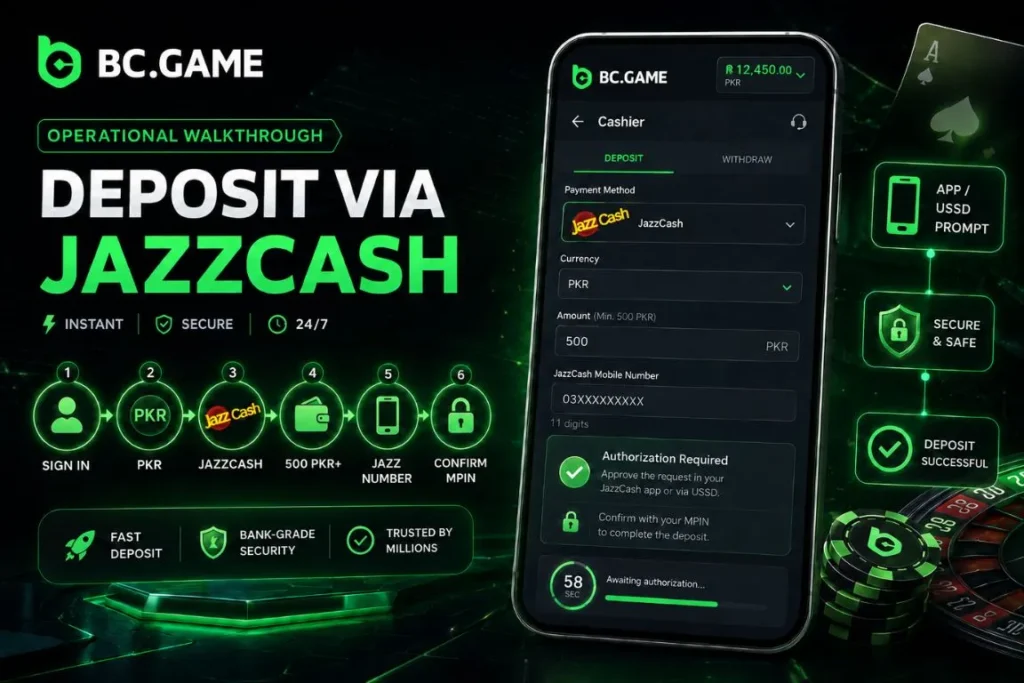
Use this process to complete a JazzCash deposit on BC Game:
- Sign in to your account and open the Deposit button from the cashier area.
- Select the Fiat balance section and set your currency preference to PKR.
- Choose the official BC Game JazzCash option from the localized payment methods.
- Enter the amount you want to send, starting from the minimum rule of 500 PKR.
- Add the exact 11-digit Jazz number connected to your registered wallet.
- Wait for the secure USSD or app authorization prompt and confirm the transfer with your private 4-digit MPIN.
Once the MPIN is accepted, the deposit normally appears quickly. Do not refresh aggressively or create a second request within seconds. Give the cashier a short window to update, especially during busy evening hours.
What Happens When the USSD Prompt Appears
The USSD prompt is where JazzCash asks the wallet owner to approve payment from the registered mobile number. If the phone is on another screen, the signal is weak, or the prompt is closed, the transfer may fail even when the details were correct.
Prepare the phone before pressing Confirm. Keep the Jazz SIM active and complete the MPIN step as soon as the prompt arrives.
Outbound Transfers: Withdrawing Your Balance to a JazzCash Account
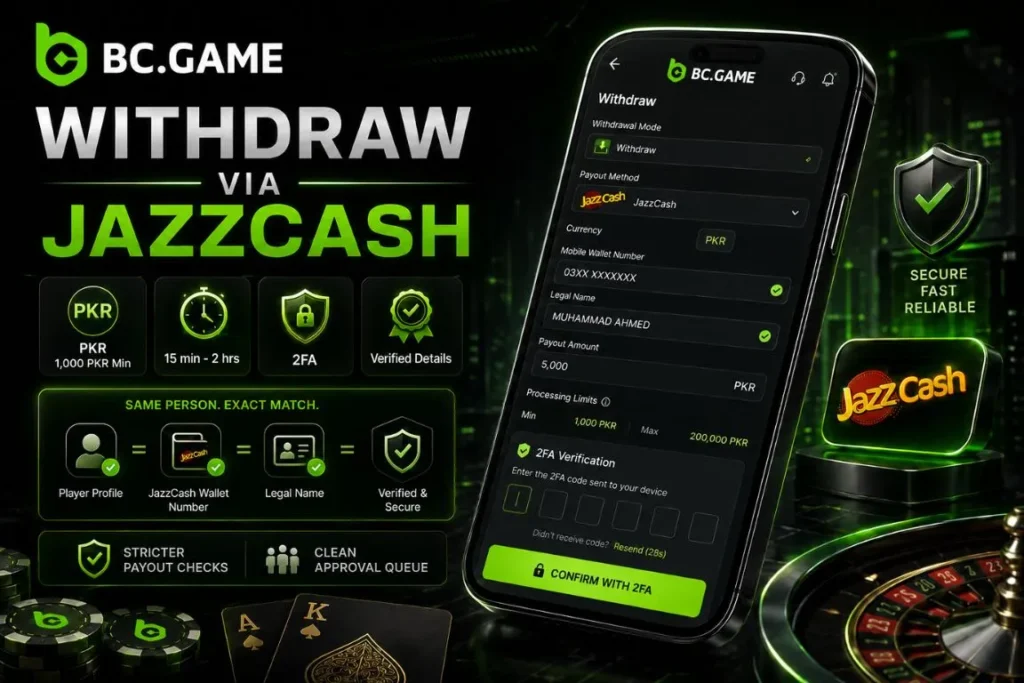
A JazzCash withdrawal carries stricter checks because funds are leaving the platform. The wallet number, legal name, and player profile should point to the same person. A payout to someone else’s wallet can be stopped by review.
The standard minimum withdrawal is 1,000 PKR. Normally, a payout may reach the wallet within 15 minutes to 2 hours. Banking delays or account review can add time.
Follow this path when requesting a JazzCash withdrawal:
- Open your account dashboard and launch the cash-out window.
- Confirm that the withdrawal currency is set to Pakistani Rupees, PKR.
- Select JazzCash as the outbound payment channel.
- Enter the valid mobile wallet number and the exact legal name linked to the Mobilink bank account.
- Add the payout amount and review the visible processing limits.
- Confirm the request with your 2FA token so the payment can move into the approval queue.
After submission, leave the payout route unchanged. Editing names or switching wallet numbers only creates more checks. The fastest withdrawal usually has boring, perfectly matching details.
Matching the Wallet Owner Name with the Player Profile
BC Game’s payment rules are built around personal account use. Pakistani players should treat the JazzCash wallet as part of the same identity chain as the casino profile. The wallet name, phone number, and verification details need to match.
This is practical, not just formal. Matching information helps support confirm ownership faster. A mismatched wallet creates more questions and a higher chance of rejection.
System Incentives and Automated Player Rewards
BC Game rewards are managed inside the account system, so JazzCash users do not need to interrupt payment with any manual reward entry. After a qualifying PKR deposit arrives, available rewards can be viewed in the profile, rewards page, or VIP area.
The deposit structure may show four stages: 180% on the first qualifying deposit, 240% on the second, 300% on the third, and 360% on the fourth, subject to the current terms shown in the active reward area. Players may also see Lucky Spin once per day, plus rakeback, cashback, BCD reward balances, weekly rewards, monthly rewards, and VIP benefits. Availability depends on account status and current terms.
The reward area is easier to manage when the player understands what each part does:
- Direct crediting. Eligible rewards attach to the account after the qualifying PKR payment clears.
- Percentage tiers. Later qualifying deposits may carry higher reward percentages than the first one.
- Progress tracking. Turnover progress is visible from the account area.
- VIP visibility. Higher activity can unlock faster withdrawals, dedicated support, and exclusive account benefits.
Players should read active reward terms before using reward funds. Where turnover applies, a deposit-linked balance may require 40x playthrough on the deposit plus reward amount.
Troubleshooting: Resolving JazzCash Connection Lags and Failed Payments
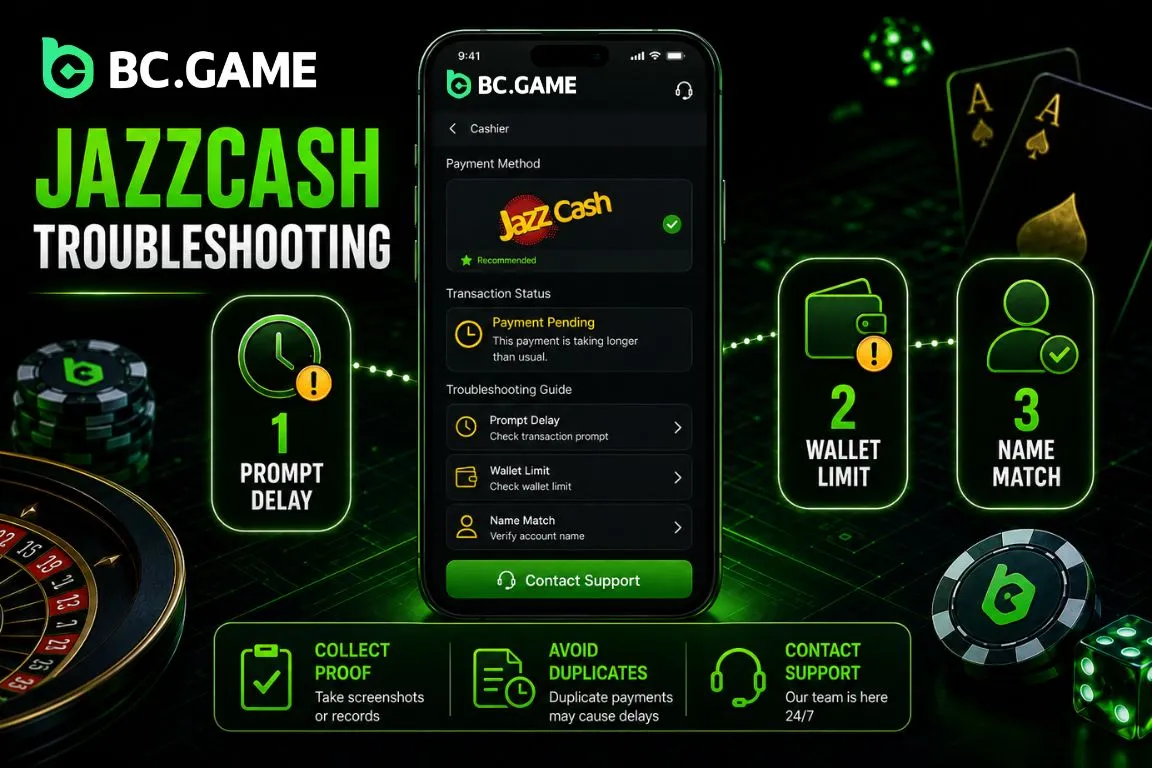
JazzCash payment issues often look similar: the number was entered, the amount looked correct, but the balance did not update. The cause may differ. The USSD prompt may be delayed, the wallet may hit a Level 0 or Level 1 limit, or the payout may fail because the account title does not match the player profile.
Slow down, collect proof, and avoid repeating the same request too quickly. Duplicate attempts make the cashier history harder to read.
| Error Status Context | Core Underlying Trigger | Immediate Resolution Pathway |
|---|---|---|
| USSD Prompt Timeout | Network delay or mobile carrier congestion | Keep the SIM active, unlock the device, and restart the request. |
| Account Limit Bounded | Wallet-level transaction limits are already used | Complete biometric verification or use another available payment method. |
| Verification Rejected | Name mismatch between player profile and bank record | Align the profile identity with the JazzCash wallet title before trying again. |
Before escalation, prepare the information support needs:
- Receipt. Save the JazzCash payment message or app confirmation with the reference visible.
- Time. Note when the wallet was debited and when the cashier request was created.
- Number check. Confirm that the mobile wallet number was typed correctly.
- Single request. Avoid sending the same amount again while the first transfer is pending.
- Privacy. Do not share your MPIN, OTP, CNIC image, or full wallet access details.
If the wallet was not debited, restart the request. If it was debited and the BC Game balance did not move, wait a reasonable window and send the reference to live support.
Responsible Gambling
Gambling should be treated as entertainment, not a way to earn income or move money, and is intended only for adults of legal age. Deposit only what you can afford to lose, set deposit, loss, and time limits in advance, and avoid chasing losses. If gambling starts to affect daily life or finances, use the platform’s self management tools such as deposit limits and self exclusion, and consider reaching out to a professional support service. Please also note that online gambling is subject to local laws, which are restrictive in Pakistan, and each user is responsible for checking whether access and play are permitted in their location.
FAQ: Strategic Financial Operations Manual for Pakistani Players
Does the platform charge fees on BC Game JazzCash deposits?
Standard incoming PKR deposits through JazzCash are not charged internally by the platform. Any wallet-side fee should be checked before final confirmation.
Why is my balance still unchanged after I approved the payment?
The wallet may be waiting on settlement, the mobile network may have delayed the response, or the cashier may still be checking the reference. Wait briefly, then contact support with the receipt if needed.
Can I withdraw to a JazzCash wallet that belongs to a relative?
No. The outbound wallet should belong to the same person who owns the BC Game profile. Third-party wallet routing can trigger rejection or manual review.
What is the minimum withdrawal in Pakistani Rupees?
The standard minimum withdrawal for this setup is 1,000 PKR. The live cashier screen should still be checked before each payout.
Before requesting a payout, run through this final checklist:
- Turnover status. Make sure no active reward balance still requires standard playthrough.
- Wallet title. Confirm that the JazzCash account belongs to you.
- Phone signal. Keep the registered number available for payment alerts.
- 2FA. Keep the authenticator active before submitting withdrawals.
- Payment proof. Save every receipt until the money appears in your wallet.
JazzCash is fast when the details line up. Keep it clean: correct number, matching name, active SIM, MPIN, and no rushed duplicate requests. That is often the difference between a normal payout and a support case.